
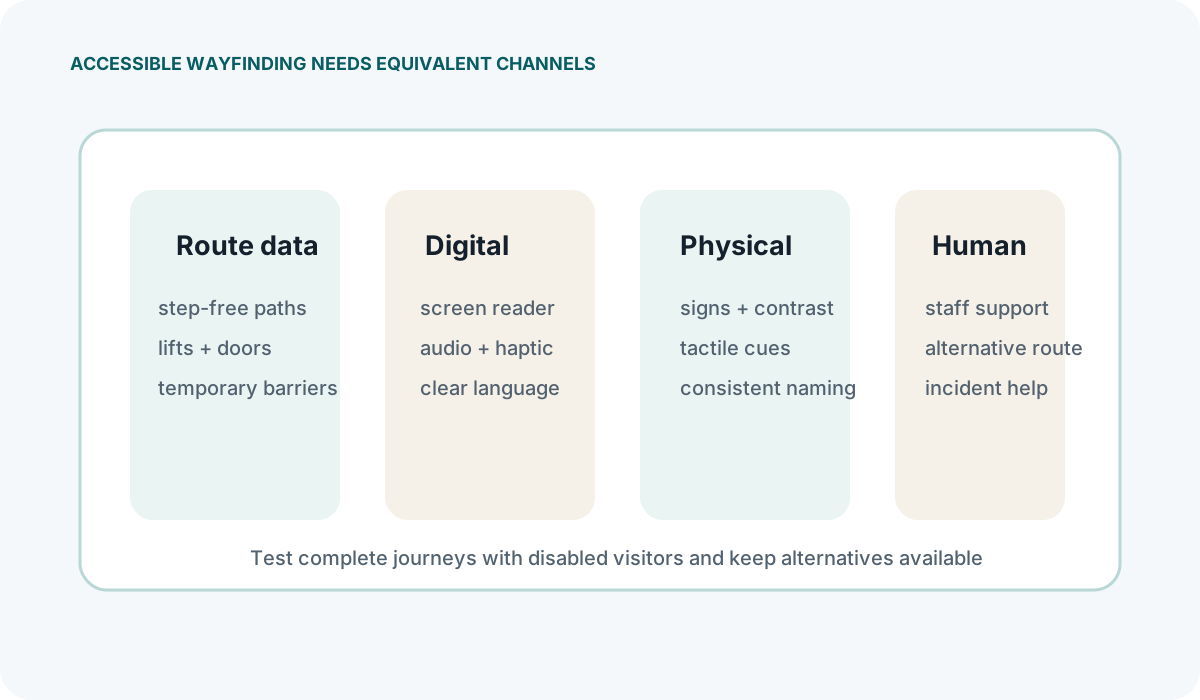
Indoor navigation systems are often designed around the assumptions of someone who can see a floor plan, read a screen and walk a direct route. For a significant portion of visitors, those assumptions fail. Accessibility in indoor wayfinding is not a feature to add later; it shapes decisions about mapping, hardware placement, interface design and testing from the outset. This guide covers what operational managers, venue teams and integrators need to consider when specifying or evaluating an accessible indoor navigation system.
Navigation for Wheelchair Users
The shortest path on a floor plan is frequently unusable for a wheelchair user. Steps, narrow doorways, heavy fire doors, raised thresholds and changes in surface material all render a straight-line route impractical. An accessible navigation system must store and route along paths that account for these constraints, which means the underlying map data must include them in the first place.
When evaluating a system, ask whether the route engine can differentiate between a standard route and an accessible route, and on what data that distinction relies. Some platforms allow attributes such as lift access, ramp location, automatic doors and minimum clear widths to be tagged against individual segments of the indoor map. Others simply offer a single route and assume it is accessible, which is rarely adequate in older UK buildings.
Practical points to check with a supplier or integrator:
- Can the map model include attributes like door width, threshold height, surface type and gradient?
- Does the routing engine allow the user to select a mobility profile, or is accessibility treated as a global setting?
- How are temporary obstructions — a broken lift, a blocked corridor — communicated to a wheelchair user mid-route?
- What happens when no fully accessible route exists between two points? The system should say so clearly rather than directing the user into an impassable space.
Beacon and sensor placement also matters. If beacons are mounted at ceiling level in a space with varying ceiling heights or mezzanine floors, the signal geometry may differ for a device held at wheelchair height compared with one held at standing height. During calibration, include measurements at the heights where devices will actually be carried.
Audio Wayfinding and Screen Reader Compatibility
Turn-by-turn indoor directions delivered by voice are essential for many visitors with visual impairments, but the quality of that experience depends heavily on how the navigation interface is built. A system that works visually can still be completely unusable with a screen reader if the underlying code lacks semantic structure, labelled elements and logical reading order.
Native applications generally offer more control over audio output, background behaviour and haptic feedback than web-based alternatives. However, Web Content Accessibility Guidelines (WCAG) compliance is still relevant for any web components, and a native app that ignores platform accessibility APIs will fail regardless of its other capabilities.
Key questions for a system provider:
- Does the app or web interface support VoiceOver on iOS and TalkBack on Android without custom workarounds?
- Are dynamic updates — such as "turn left in five metres" — announced automatically by the screen reader, or does the user have to interact with the screen each time?
- Can the user adjust speech rate and verbosity without leaving the navigation flow?
- How does the system handle background audio? If the visitor is also using a personal audio guide, the two streams need to coexist without one drowning out the other.
Audio wayfinding also raises practical concerns in noisy environments. Exhibition halls, transport hubs and event venues often have ambient sound levels that make spoken directions difficult to follow. Consider whether the system offers headphone routing, and whether the venue can reasonably expect visitors to use headphones for safety reasons in certain spaces.
Visual Impairment and Haptic Guidance
Not all visually impaired visitors rely solely on audio. Haptic feedback — vibration patterns delivered through a smartphone — can supplement or replace spoken directions in situations where audio is impractical or unwanted. A distinct vibration pattern for "approaching a turn" or "you have arrived" provides information without requiring the visitor to look at the screen or listen to speech.
Haptic guidance has clear limitations. Vibration motors in smartphones vary considerably in strength and precision between models. A pattern that is clearly distinguishable on one device may be imperceptible on another, particularly if the phone is in a pocket or bag rather than held in the hand. These are hardware constraints that no software layer can fully overcome.
Beacon-based proximity alerts offer another mechanism. Rather than continuous turn-by-turn guidance, the system can trigger a notification when the user enters a defined zone — for example, arriving at a lift lobby, reaching a tactile map position or approaching a specific exhibit. This zone-based approach is less precise than continuous routing but more robust, because it does not depend on smooth signal gradients or constant screen interaction.
When specifying haptic or zone-based features, establish what the visitor is actually expected to do with the information. A vibration that means "you are near something" is less useful than one that means "turn left here". The mapping between physical signal and human action needs to be defined, tested and documented, not left to intuition.
Accessibility Standards for Indoor Wayfinding
Several standards and guidance documents are relevant to accessible indoor navigation, though none specifically prescribe how a Bluetooth beacon system should behave. Understanding what each standard covers — and where its boundaries lie — helps when writing requirements or evaluating a supplier's claims.
BS 8300 and BS 8300-2: These British Standards address the design of accessible buildings and external environments. They cover tactile signage, contrast, floor surface specifications and the physical infrastructure that an indoor navigation system must align with. They do not cover digital wayfinding directly, but any navigation system that routes users past non-compliant signage or through spaces that fail BS 8300 criteria has a fundamental problem.
EN 17210: This European standard covers accessibility and usability of the built environment. It is broader than BS 8300 in some areas and provides a useful cross-reference for venues operating across multiple jurisdictions.
WCAG 2.1 and 2.2: The Web Content Accessibility Guidelines apply to the digital interface of the navigation system — the app screen, the web page, any kiosk or touchpoint. Compliance at level AA is the commonly referenced benchmark. Check which version a supplier claims to meet and whether that claim has been tested by a third party or is self-assessed.
Equality Act 2010: UK law requires service providers to make reasonable adjustments for disabled people. An indoor navigation system may form part of that adjustment, but the Act does not prescribe technical standards. It is a legal framework, not a specification, and specific legal advice should be sought for compliance questions.
A common mistake is to assume that because a system's interface meets WCAG, the overall wayfinding experience is accessible. The digital layer is only one part. If the routes it suggests are physically inaccessible, or if the hardware is mounted where it cannot be reached, WCAG compliance on the screen does not solve the problem.
Testing Navigation with Disabled Visitors
Testing an indoor navigation system exclusively with non-disabled staff members will not reveal accessibility failures. The gaps tend to appear not in obvious places but in the interactions between the digital system and the physical environment — a route that works on paper but leads to a door that is too heavy, a voice prompt that is technically correct but ambiguous at a complex junction, or a beacon zone that triggers at the wrong point because calibration was done at standing height.
Meaningful accessibility testing involves disabled visitors using the system in realistic conditions, not a controlled demonstration. Practical steps include:
- Recruiting test participants with a range of access needs — wheelchair users, people with different levels of visual impairment, people who are Deaf or hard of hearing, and people with cognitive or learning disabilities.
- Testing at times that reflect real venue conditions, including peak noise levels and crowded corridors, rather than quiet periods.
- Asking participants to complete specific journeys they would actually want to make, not scripted paths chosen for convenience.
- Observing where participants hesitate, deviate from the suggested route or abandon the system entirely, and asking why.
- Running repeat tests after any adjustments to confirm that changes actually improved the experience rather than shifting the problem elsewhere.
Document the results in a form that connects specific failures to specific system components — map data, routing logic, interface behaviour, beacon placement or calibration parameters. Vague feedback such as "it was confusing" is not actionable. "The voice prompt said 'turn left' but there were two left options and the screen gave no additional detail" is something an integrator can address.
Accessibility testing is not a one-time activity. Venue layouts change, exhibits move, temporary structures appear and hardware degrades. Build a schedule for re-testing that aligns with the venue's maintenance and change cycles, and treat disabled visitor feedback received during normal operations as input into that process rather than a separate complaints category.


