
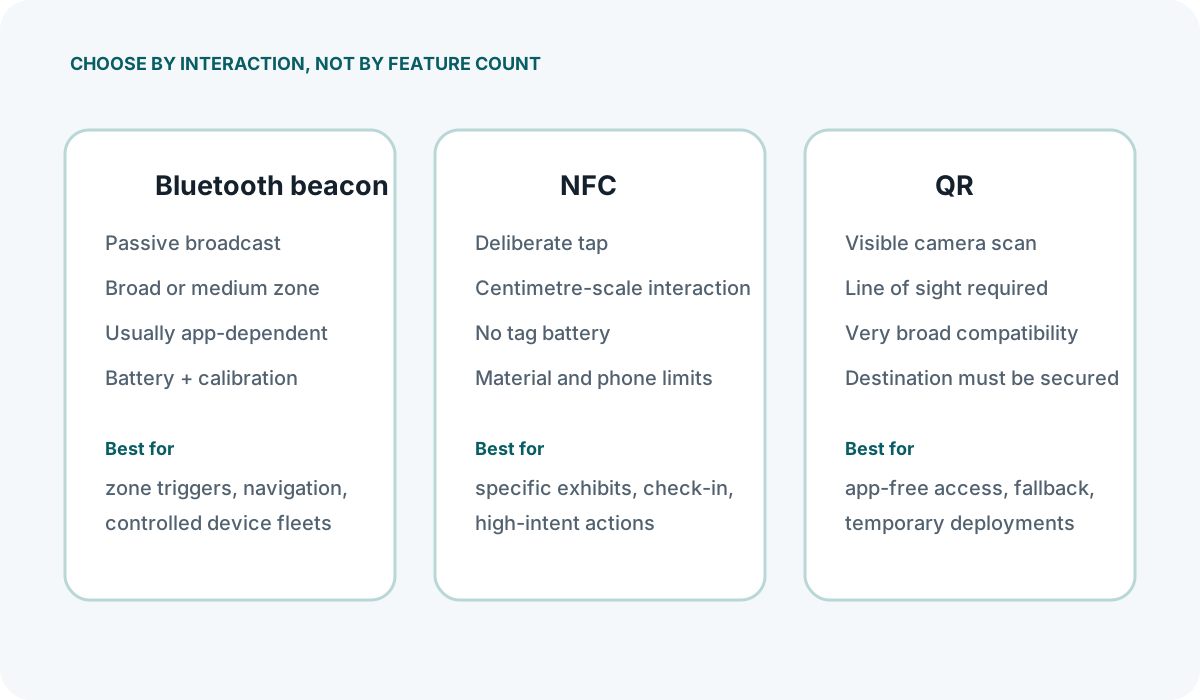
How Beacons, NFC and QR Differ
Bluetooth beacons, NFC tags and QR codes solve overlapping problems—delivering location-specific information or triggering an action when someone is near a particular point—but they do so in fundamentally different ways. The choice between them is not about picking the "best" technology in the abstract. It depends on what you need to happen at the point of interaction, what the visitor is expected to carry, and what your team can realistically maintain.
Bluetooth beacons broadcast a small radio packet at regular intervals. A smartphone within range can detect that signal, provided it is running an app or, in some cases, a compatible browser with permissions enabled. The beacon itself does not know who is nearby; it simply transmits. The phone does the detecting, and the associated software decides what to do with that information. This makes beacons suited to push interactions: the system can trigger a notification or log a visit without the visitor taking a deliberate action.
NFC (Near Field Communication) tags contain a tiny microchip and antenna. They hold a small payload—typically a URL or a short text string—and they deliver it only when a phone is held within a few centimetres. The tag has no power source; it is energised by the phone's magnetic field. This makes NFC a pull interaction: the visitor chooses to tap, and receives the content immediately in return. No app is required on most modern smartphones.
QR codes are printed or displayed patterns that encode a URL or other data. A phone camera reads the pattern and opens the link. Like NFC, this is a pull interaction driven by the visitor. Unlike NFC, it works at a distance—within the camera's focus range, typically a metre or so—and requires no special hardware at the physical site beyond the printed code itself.
The practical distinction, then, comes down to three questions. Does the interaction need to happen automatically, or only when the visitor deliberately engages? Does the visitor need an app installed, or must the experience work for anyone with a standard phone? And what physical constraints exist at the point of use—lighting levels, mounting surfaces, distance from the visitor's path?
Choosing by Visitor Journey and Venue
Retail environments
In a shop, beacons can detect when a customer enters a zone near a particular display and, if the retailer's app is installed and permissions are granted, push a notification about a relevant offer. That automatic trigger is something neither NFC nor QR can replicate without requiring the customer to scan or tap first. However, the app requirement is a significant filter: only customers who have downloaded and kept the app will receive anything.
QR codes on shelf edges or product displays work for any customer with a camera. They are effective for linking to product details, ingredient lists, or stock-checking pages. The trade-off is that the customer must notice the code, open their camera, and scan it. NFC tags fixed beneath a display surface offer a similar pull experience but feel more deliberate and are less affected by poor lighting, though they require the customer to know where to tap.
Museums and exhibits
Museums face a specific set of constraints. Visitors may not want to download an app for a single visit, which limits beacon-only strategies unless the venue provides devices. QR codes printed on exhibit labels are straightforward: visitors scan to access text, audio or images. NFC tags embedded in plinths or labels offer a cleaner aesthetic than a printed QR code and work reliably in dimly lit galleries where camera-based scanning can be slow, but they cost more per unit and require precise mounting within tap range.
Beacons in museums tend to be used for indoor navigation and zone detection—knowing roughly which gallery a visitor is in—rather than exhibit-level content delivery, because the accuracy required to distinguish between two adjacent exhibits is difficult to achieve consistently without careful calibration and a controlled radio environment.
Events and temporary venues
For short-duration events, QR codes printed on lanyards, signage and schedules are the lowest-friction option. They cost almost nothing to produce, can be generated minutes before doors open, and require no hardware to deploy or recover. NFC wristbands or badges can streamline check-in and access control, but they require dedicated readers at each point and a supplier who can encode and manage the tags at scale. Beacons installed for a three-day event face the same placement and calibration effort as a permanent installation, which is difficult to justify unless the event returns to the same venue regularly and the infrastructure can remain in place.
Asset and exhibit information points
When the requirement is simply to attach a stable link to a physical object—a piece of equipment, a display case, a fixed asset—both NFC and QR are viable. NFC tags are more durable and resistant to wear than printed codes, and they can be concealed. QR codes are cheaper and easier to replace if the linked URL needs to change, provided you are using a dynamic QR service rather than a static encoded URL. Beacons are not a natural fit here: attaching a battery-powered radio to a stationary object just to hold a link introduces unnecessary complexity and maintenance.
Decision Checks Before Procurement
Assuming universal phone compatibility
Most modern smartphones support NFC and have cameras capable of reading QR codes, but the experience is not identical across devices. On some Android devices, NFC taps open the browser directly. On others, or on certain iOS versions, the behaviour may depend on whether an app is registered for the tag's protocol. QR code handling varies by operating system and browser: some devices open links in an in-app browser with restricted features. Test the exact interaction path on the phone models your visitors are most likely to use, rather than assuming a single behaviour.
Overlooking the maintenance burden
QR codes printed on paper or card will degrade with handling and cleaning. Codes placed at floor level or on frequently touched surfaces may become unreadable within weeks. NFC tags are more robust physically, but the adhesive can fail, or the tag can be dislodged. Beaacons require battery monitoring and eventual replacement. Whichever technology you choose, build a maintenance schedule into the project from the start, and assign responsibility for checking and replacing units. A broken QR code or a dead beacon is not a minor inconvenience; it is a failed interaction that erodes trust in the system.
Confusing range with accuracy
Beacons have a useful range of several metres, but that range does not translate into metre-level accuracy. The received signal strength indicator (RSSI) that phones use to estimate distance fluctuates with obstacles, human bodies, and other radio sources. Do not assume that a beacon placed two metres from an exhibit will reliably trigger an action only when someone stands directly in front of it. If you need precise point-of-interest triggering, NFC or QR is the more honest choice.
Ignoring consent and privacy obligations
Beacon-based experiences commonly require an installed application, operating-system permissions and a separate privacy explanation. Whether personal data is processed, which lawful basis applies and whether PECR is engaged depend on the actual architecture and communication. NFC taps and QR scans are deliberate actions, but the destination can still set cookies, collect analytics or link the visit to an account. Map the complete data flow for every technology used.
Key checks before committing
- Interaction model: Does the use case require an automatic push, or is a visitor-initiated pull acceptable or preferable?
- App dependency: Can you reasonably expect your audience to have a specific app installed, or must the experience work app-free?
- Physical environment: Is there adequate lighting for camera-based scanning? Are there surfaces suitable for NFC mounting at tap height? Is the radio environment sufficiently controlled for beacon placement?
- Maintenance capacity: Who will inspect, clean, replace batteries, and update links, and how often?
- Privacy compliance: Have you mapped what data each technology collects, documented the lawful basis, and prepared a clear privacy notice?
- Pilot evidence: Have you tested the chosen technology in the actual space, with real devices, before committing to a full rollout?
The right technology is the one that fits the physical constraints of your space, the behaviour you can realistically expect from your visitors, and the ongoing maintenance your operations team can sustain. In many cases, the decision becomes clear once those three factors are laid out honestly, rather than compared on a feature matrix.


