
What must be ready before the work starts
A proximity pilot is a bounded, measured test of location technology—typically Bluetooth Low Energy (BLE) beacons, NFC tags, or QR codes—within a defined physical space. Its purpose is not to prove that the technology works in a laboratory, but to determine whether it behaves reliably in your specific environment when subjected to real building materials, visitor traffic patterns and device variability.
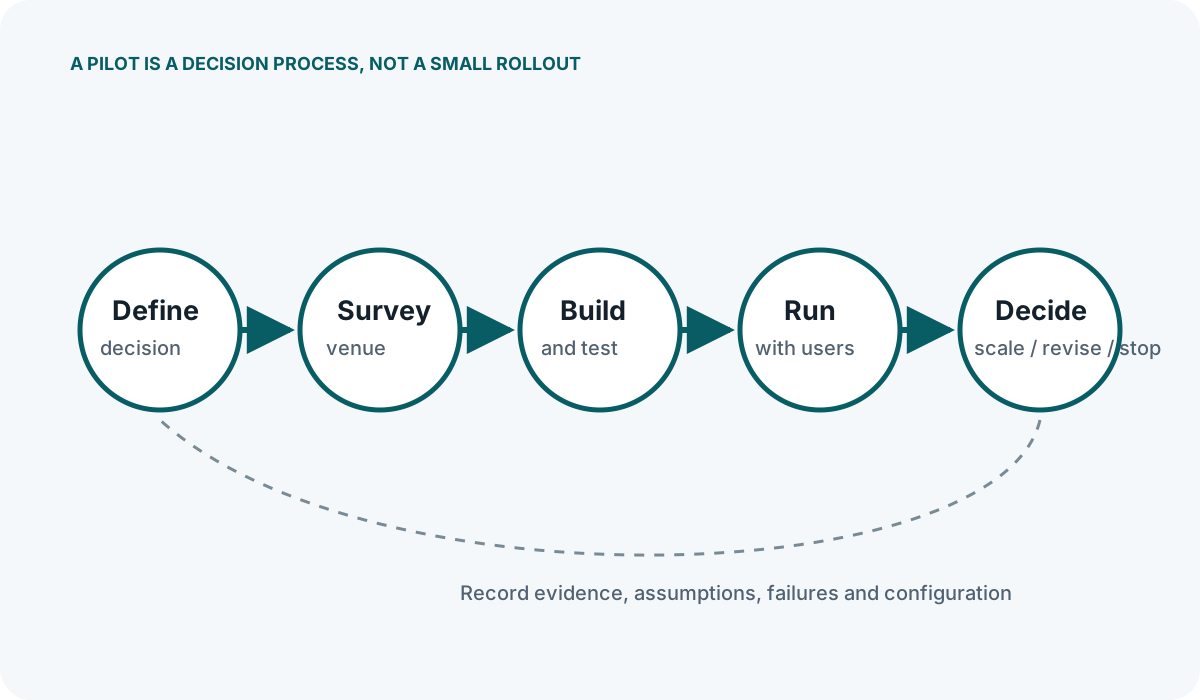
Designing the pilot means deciding exactly which question you need the test to answer. A poorly scoped pilot tries to evaluate hardware, software, content, consent mechanisms and analytics all at once, making it impossible to isolate the cause when something underperforms. An effective pilot restricts itself to one or two core questions, such as whether beacons can reliably trigger a notification at a specific exhibit, or whether visitors will scan a QR code when presented without staff prompting.
The design phase also requires accepting the physical constraints of your venue before any hardware is unboxed. Radio frequency behaviour depends on the materials present, the density of people in the space and the positions of metal fixtures. A pilot designed without accounting for these variables will produce misleading results that do not scale to a full deployment.
From preparation to live testing
Selecting the Technology for the Pilot Scope
Choosing between BLE, NFC and QR for a pilot should follow from the use case, not from a general preference. If the pilot needs to trigger an interaction passively as someone walks past, BLE is the only suitable option. If the interaction requires the visitor to deliberately touch a specific point, NFC or QR may be more appropriate. In some pilots, it is valid to run two technologies in parallel within the same zone to compare opt-in rates and reliability, provided the evaluation criteria are defined before the test begins.
Defining the Pilot Zone
Resist the temptation to cover a large area. A well-designed pilot typically occupies a single zone: one retail aisle, one museum gallery, or one corridor leading to an event hall. A constrained zone makes it straightforward to map signal behaviour, observe visitor interactions directly and retrieve hardware for adjustment. It also limits the number of beacons or tags required, keeping the initial procurement manageable and reducing the inventory you need to track.
Use Case Examples
In a retail setting, a pilot might focus on a single promotional end-cap to test whether a push notification offering a discount influences dwell time or conversion. The design must specify the trigger radius, the exact text of the notification, the landing page destination and the metric used to judge success.
In a museum, a pilot might target a single room with five exhibits to test whether visitors will use their own devices to access audio content instead of borrowed hardware. Here, the design must account for the proximity of exhibits to one another, as triggering content for the wrong exhibit is a common failure mode in dense galleries.
At an event, a pilot might be confined to the registration area to test NFC tap-in versus QR scan-in for badge collection. The design would measure throughput, failure rates and staff intervention requirements.
Consent and Privacy Boundaries
A pilot must incorporate the same consent and transparency requirements as a full deployment, even if the audience is smaller. Under current UK privacy guidance, visitors need to know what data is being collected, how it will be used and how long it will be kept. For a pilot, it is often practical to limit data collection to the minimum necessary to evaluate the technology—for example, recording that a trigger occurred without logging a persistent device identifier. Design the consent flow as a core part of the pilot, not an afterthought.
Exceptions, follow-up and lifecycle control
Piloting in an Empty Venue
One of the most frequent errors is conducting signal tests outside operating hours. The human body absorbs and reflects Bluetooth signals significantly. RSSI readings taken in an empty corridor will not match the readings during a busy afternoon. The pilot design must include testing during representative operating conditions, even if initial placement is done when the venue is quiet.
Changing Too Many Variables
If the pilot involves new beacons, a new app version, new content and a new analytics platform simultaneously, a failure tells you nothing useful. Isolate variables. If testing beacon placement, use proven content and a stable app. If testing the content, keep the hardware configuration fixed. Document every variable so that the results can be interpreted accurately.
Ignoring Firmware and Battery State
Using a mixed batch of beacons with different firmware versions or varying battery charge levels will introduce inconsistent transmit power and advertising intervals. Before the pilot begins, standardise the firmware across all units, confirm battery voltages and record the baseline settings. This removes a common source of unexplained variance during evaluation.
Accepting RSSI Variance
Do not design a pilot that expects exact distance accuracy from RSSI alone. RSSI fluctuates due to device antenna differences, hand position and minor environmental changes. Design the pilot around zones—such as "near", "immediate" and "out of range"—rather than precise metre measurements, unless you are specifically testing a calibrated positioning engine that accounts for these variances.
Key Checks Before Going Live
- Mounting consistency: Are all beacons attached with the same orientation and at the same height? Changing a beacon from vertical to horizontal mounting alters its radiation pattern.
- Interference baseline: Have you scanned the pilot zone for existing BLE devices, Wi-Fi access points and other 2.4 GHz sources that could cause interference?
- Trigger boundaries: Have you physically walked the boundary of each trigger zone with multiple smartphone models to confirm where the notification fires and where it stops?
- Fallback behaviour: If the app cannot connect to the server to fetch content, what does the visitor see? The pilot design must account for poor internal connectivity.
- Opt-out clarity: Can a visitor who opted in during the pilot easily and permanently revoke consent, and does the system honour that revocation immediately?
Designing the pilot rigorously does not guarantee a flawless result, but it ensures that whatever result you get is actionable. When the pilot reveals a limitation—whether in signal behaviour, visitor engagement or operational workload—you will know whether the issue stems from the physical environment, the technology choice or the content strategy, and you can adjust the next phase accordingly.


