
What the work must achieve
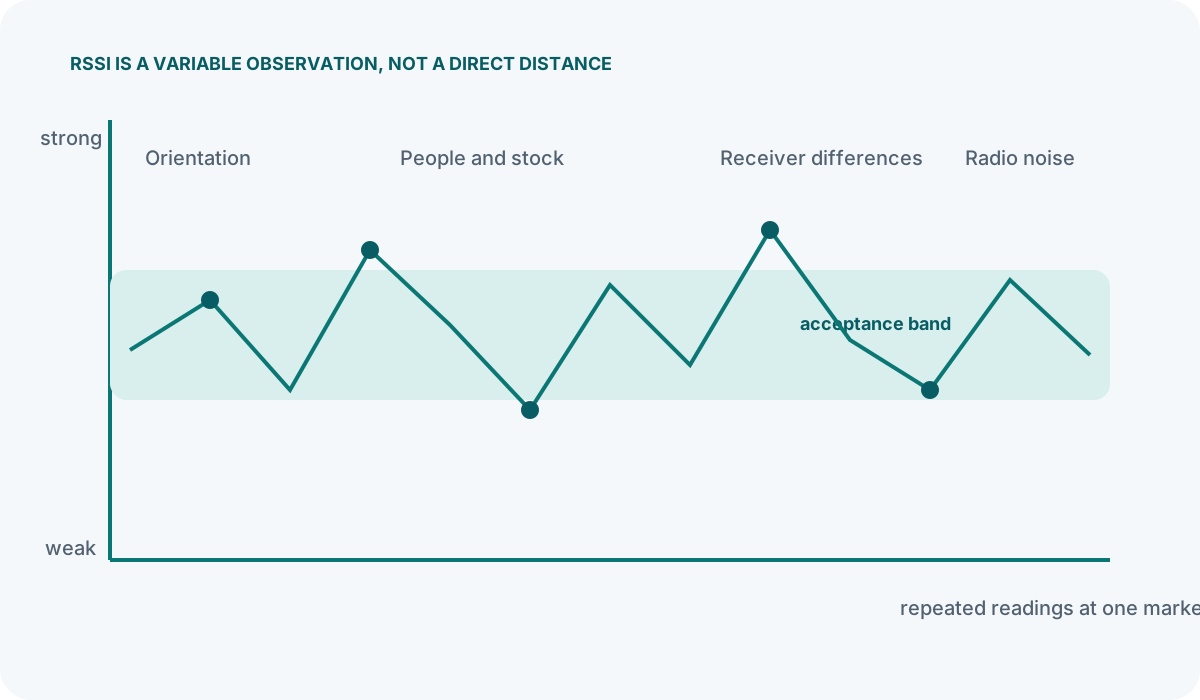
Bluetooth beacons do not measure distance. They broadcast small packets of data at a set interval and power level, and a receiving device—typically a smartphone—estimates how far away the beacon is by reading the signal strength. That signal strength value is the Received Signal Strength Indicator (RSSI). Because the beacon itself has no awareness of the receiver, any accuracy claim is really a statement about how well a particular receiver, in a particular environment, can turn an RSSI reading into a useful distance estimate.
This distinction matters because it means no beacon manufacturer can honestly give you a single accuracy figure that applies to your site. A datasheet might state a range of one to three metres, but that figure assumes open air, a specific antenna pattern, and a receiver held at a consistent angle. Move the same hardware into a retail unit with racking, stock, and people, and the reliable accuracy band will change—sometimes considerably.
In practice, beacon accuracy falls into rough categories rather than precise distances:
- Immediate (roughly within 0.5 m): Possible in controlled conditions with on-body placement, but unreliable in most real-world venues without extensive per-site calibration.
- Near (roughly 1–3 m): Achievable in open or lightly furnished spaces after calibration. Sufficient for exhibit-level triggers in museums and zone entry in shops.
- Far (roughly 3–10 m and beyond): Reliable for broad zone detection—knowing someone has entered a department or a hall, for example.
The critical point for operational planning is that zone-based detection is considerably more dependable than point-level positioning. If your use case requires knowing which room someone is in, beacons perform well. If you need to know which exact shelf they are standing beside, you should treat beacon accuracy with caution and plan a rigorous pilot before committing.
Coordinate technology, people and process
Retail environments
Most retail proximity deployments use beacons to detect when a shopper enters a zone: the entrance, a particular department, or a queue area. For these triggers, accuracy of two to three metres is usually adequate. The beacon is placed above the zone—ceiling-mounted or high on a wall—and the app or web layer fires a notification when the RSSI crosses a defined threshold.
Attempts to use beacons for shelf-level targeting run into practical difficulties. Racking absorbs and reflects signals, stock levels change weekly, and the angle at which a customer holds their phone varies. A pilot that appears to work on a Tuesday morning with empty aisles may fail on a Saturday afternoon. If shelf-level accuracy is a firm requirement, treat the pilot as a genuine feasibility test, not a formality, and measure results across different trading conditions.
Museums and galleries
Museum audio guide triggers are a strong fit for beacon technology because the requirement is exhibit-level, not centimetre-level. A beacon placed near a painting or display case only needs to distinguish that exhibit from the next one two or three metres away. With careful placement—keeping beacons away from metal frames, glass cases, and thick partition walls—and sensible threshold settings, this level of accuracy is routinely achievable.
Where museums encounter difficulty is in open-plan galleries with closely spaced exhibits or in spaces where exhibits are rearranged. Each rehang can shift the effective zones, so the trigger logic needs to be simple enough to tolerate some overlap without firing the wrong content.
Indoor navigation
Navigation demands more from accuracy than simple zone triggers. A user following a route expects the blue dot to stay on the correct corridor, not jump to an adjacent one. This typically requires a denser grid of beacons, careful calibration across the entire floorplan, and software that combines multiple beacon readings rather than relying on a single strongest signal. Even then, accuracy will vary by area—open atriums behave differently from narrow corridors. Navigation deployments should be planned with the understanding that some areas will perform better than others, and signage or floor markings should support the digital guidance rather than relying on it entirely.
Asset and equipment tracking
When beacons are attached to assets—trolleys, tools, equipment—the question is usually "which zone is this item in?" rather than "where exactly is it?" Zone-level presence is a reliable use case. Precise location within a zone is not, unless the environment is tightly controlled and the beacon density is high enough to support trilateration, which brings its own calibration and maintenance overhead.
What to maintain after launch
Taking datasheet figures at face value
Manufacturer accuracy ranges are measured in controlled conditions that rarely match a live venue. The most common planning mistake is to read "1–3 m accuracy" and assume that figure will hold in a cluttered retail space or a heritage building with thick walls. Treat datasheet numbers as an upper-bound indicator of what the hardware can achieve under ideal radio conditions, not as a guarantee for your site.
Assuming all phones behave the same
Different smartphone models use different Bluetooth chipsets and antenna designs. Two phones held side by side can report noticeably different RSSI values from the same beacon. iOS and Android devices also handle Bluetooth scanning differently, particularly in the background. Any accuracy assessment that relies on a single phone model during testing will not reflect real-world performance. Test with a representative mix of devices, and expect a spread of readings rather than a single consistent distance.
Ignoring body absorption
The human body attenuates Bluetooth signals significantly. A beacon mounted at chest height on a wall will produce a very different RSSI reading when the user is facing it versus when they have walked past and the signal is passing through their body. For wearable beacons, the effect is even more pronounced. Placement plans should account for the typical orientation of the user relative to the beacon, not just the straight-line distance.
Confusing precision with reliability
A system that reports a distance of "2.3 metres" looks precise, but if that figure swings between 1.1 m and 4.7 m over a few seconds, it is not reliable. For most proximity use cases, a stable zone assignment—"you are in the footwear department"—is far more useful than a fluctuating metre-level estimate. When evaluating a platform or integrator, ask to see how stable the readings are over time, not just how fine-grained they appear on a dashboard.
Key checks before committing to a deployment
- Test in the actual space, not a similar one. Radio behaviour is specific to the materials, layout, and contents of your venue.
- Test with multiple device types covering both major operating systems and a range of common handset models.
- Test across different occupancy levels. An empty room and a busy one produce different results.
- Ask the supplier what accuracy their figure assumes—open air, specific receiver, specific orientation—and what they expect in a environment like yours.
- Define "accurate enough" for your use case before testing. If you need zone detection, say so. If you need point-level positioning, say so. These require different approaches.
- Document the conditions during testing—beacon settings, placement height, phone models, firmware versions—so results can be reproduced and compared later.
Bluetooth beacons are a mature and dependable technology for zone-based proximity detection. Where they struggle is when operators expect precise, consistent positioning without the calibration, density, and environmental control that precision demands. Understanding the difference between those two outcomes is the single most useful thing you can do before planning a deployment.

