
Bluetooth Low Energy Broadcasting Explained
A Bluetooth beacon is a small hardware device that repeatedly transmits a short radio signal using Bluetooth Low Energy (BLE). Unlike classic Bluetooth, which establishes a two-way connection between devices, a beacon only broadcasts. It does not listen for replies, pair with phones, or exchange data during transmission. This one-way behaviour is what makes beacons simple to deploy and efficient on battery power.
Each broadcast consists of a small data packet, typically sent at a configurable interval. The advertising interval determines how frequently the beacon transmits: a shorter interval means a receiving device detects the beacon sooner, but it also draws more current from the battery. A longer interval conserves power but introduces a slight delay before a device registers the beacon's presence. Most deployments settle somewhere in the middle, balancing responsiveness against battery life.
The transmit power setting controls how strong the radio signal is at the point of broadcast. Higher transmit power extends the theoretical range but uses more energy. Lower transmit power restricts the signal to a smaller area, which can be useful when you need to define a tight zone — for example, directly in front of a specific exhibit rather than across an entire gallery.
Because the beacon only advertises, it has no knowledge of whether anything is listening. It cannot tell how many phones are nearby, whether a notification was delivered, or whether a user acted on a trigger. All of that logic lives on the receiving device or on a backend platform, not in the beacon itself.
Beacon Identifiers: UUID, Major and Minor
The payload inside a beacon's advertising packet carries a structured set of identifiers. The most widely recognised format arranges these into three values: UUID, Major, and Minor. Together, they allow an app or platform to determine not just that a beacon is present, but which organisation it belongs to and exactly where it is located.
The UUID is a 128-bit value that typically identifies the organisation, venue, or application. In practice, you might use one UUID for your museum's visitor app and a different UUID for a separate internal tracking system. This separation prevents your beacons from triggering unintended actions in other apps that happen to be scanning nearby.
The Major value is a 16-bit number used to group related beacons. In a multi-storey retail environment, each floor might have its own Major value. In a museum, each wing or gallery could be assigned a distinct Major. The grouping logic is entirely up to the deployer, but it should reflect a meaningful division in the physical space.
The Minor value is another 16-bit number that distinguishes individual beacons within a Major group. If Major 1 represents the ground floor and Minor 3 represents the beacon near the entrance, the receiving app can combine all three values to understand precisely where the visitor is standing.
A common mistake is treating these identifiers as secure credentials. They are not encrypted and can be read by any BLE scanner. If your use case requires that only authorised apps respond to your beacons, the identifiers alone will not achieve that — additional measures on the app or server side are necessary.
How Devices Detect and Respond to Beacons
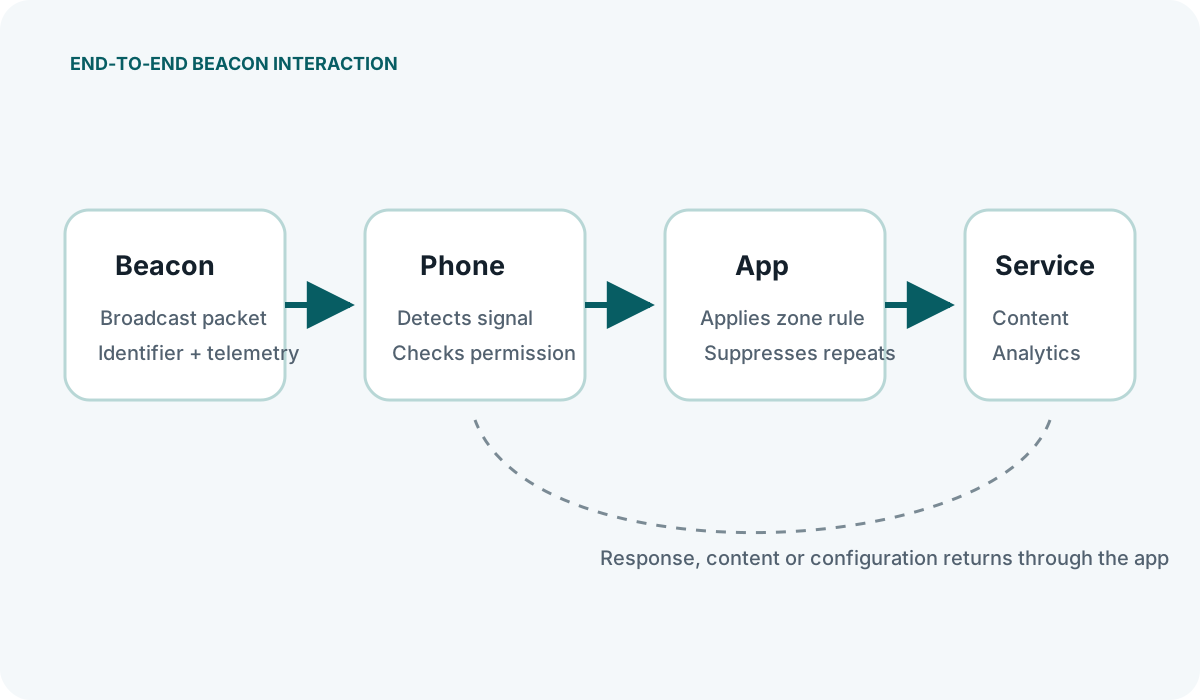
Detection happens on the receiving side. A smartphone running a compatible app periodically scans for BLE advertising packets in the background or foreground. When the phone receives a packet containing a recognised UUID, the app interprets the Major and Minor values and decides what to do: display a notification, update a map, log a visit, or take no action at all.
The decision logic is critical. A well-configured app does not fire a notification every single time it sees a beacon packet. Instead, it applies rules: minimum dwell time before triggering, cooldown periods between repeated triggers, and checks against quiet hours or user preferences. Without these guards, visitors near a boundary between two beacon zones can receive a rapid stream of conflicting messages.
Background scanning on both iOS and Android is subject to operating-system restrictions. Neither platform allows continuous unrestricted scanning. iOS, for instance, limits background detection to specific beacon regions and may throttle how often an app is woken. Android behaviour varies by manufacturer and version. Any deployment plan should account for these constraints rather than assuming the app will detect every single advertisement.
The beacon itself plays no part in the response. It cannot push content, trigger an action, or confirm delivery. If a visitor's phone has Bluetooth disabled, the app is force-closed, or the operating system suppresses background scanning, the beacon's broadcasts go unnoticed. This is why beacons are best understood as a proximity signal, not a delivery mechanism.
App-Based vs App-Free Beacon Interaction
Most operational beacon deployments rely on a dedicated app. The app handles scanning, interprets identifiers, applies business rules, and presents content to the user. This model gives the venue full control over the experience, allows background detection, and supports complex interactions such as indoor navigation or personalised content. The clear drawback is that visitors must download and install the app before beacons become useful — a significant friction point, particularly in environments with one-off or infrequent visits.
Eddystone-URL historically allowed a beacon to broadcast a compact web address. However, a URL in a beacon packet does not make modern phones display it automatically. Google Nearby Messages stopped working in December 2023, and there is no dependable cross-platform browser service that passively surfaces nearby beacon URLs. Treat Eddystone-URL as a legacy or controlled-environment format, not as a current universal app-free channel.
Current app-free journeys are usually better built around a deliberate QR scan or NFC tap. Web Bluetooth has limited browser availability, requires a secure context and explicit user action, and is designed for connecting to selected BLE peripherals rather than passive background beacon discovery. A browser-based approach must therefore be tested on the exact devices and browsers expected in the venue.
When evaluating the two approaches, the deciding factor is usually the visitor relationship. If your audience returns regularly and has a reason to keep your app, app-based detection is the more capable option. If you need to reach casual passers-by with a single, simple prompt, app-free broadcasting may be worth testing, but expectations around reliability and feature depth should be kept low.
Beacon Signal Range and Attenuation
Beacon manufacturers often quote a maximum range — sometimes up to 70 metres or more in open air. That figure describes line-of-sight transmission with no obstructions, at maximum transmit power, to a sensitive receiver. It is not a useful planning number for indoor environments.
In a real venue, the signal is attenuated by every material it passes through. Plasterboard partitions, glass, metal fixtures, racking, and even the human body all reduce signal strength to varying degrees. A beacon that reaches 50 metres in an empty warehouse might only be reliably detected at 10 to 15 metres in a furnished retail floor with shelving and stock.
Because attenuation is highly site-specific, the only reliable way to understand your actual range is to measure it. A pilot deployment with a few beacons placed at candidate positions, tested with the actual devices your visitors will carry, gives you a realistic picture of where the signal is strong enough to trigger detection and where it drops off. Relying on manufacturer range figures or rough rules of thumb often leads to beacons being placed too far apart, creating dead zones where visitors receive no signal at all.
Transmit power and advertising interval also affect effective range in practice. Lowering the transmit power shrinks the coverage area, which can be deliberate when you need to keep a beacon's zone small. Increasing the advertising interval does not change the physical range, but it means a device passing through the zone quickly might not receive enough packets to register the beacon's presence — effectively reducing the usable range for moving visitors.
For any deployment, the practical question is not "how far can this beacon reach?" but "at what distance can I consistently detect this beacon with the devices and environment in my venue?" That question can only be answered with an on-site measurement, not a datasheet.

